grack.com

Blog

Microsoft's FAT Patent Rejected

GrokLaw is just reporting that Microsoft’s FAT Patent has been rejected.  This is good news!  Check out the story on GrokLaw, or read the good bits here:

At PUBPAT’s Request, Patent Office Rejects Microsoft’s FAT Patent: All Claims of Reynolds ‘517 Patent Ruled Invalid

NEW YORK – In the reexamination proceeding initiated earlier this year by the Public Patent Foundation (“PUBPAT”), the United States Patent and Trademark Office has rejected all of the claims of Microsoft’s patent on the FAT file system, which Microsoft describes as “the ubiquitous format used for interchange of media between computers, and, since the advent of inexpensive, removable flash memory, also between digital devices.”

One down, 500 million to go.
nprof 0.9a released

I repackaged nprof 0.9 to include the missing msvcr70.dll that didn’t make it in the first time. With any luck, this should fix the issues with loading DotNetLib that people were having.

Web Developer Toolbar

If you use Firefox (you are using Firefox, right?) and you do anything even remotely related to web development - including maintaining a blog - you must download the Web Developer Toolbar.

This toolbar allows you to do everything from disable images to editing CSS live or even viewing response headers. 

If you’re editing CSS, it opens a sidebar with the current stylesheets loaded in separate tabs on the left.  As you type in each stylesheet, the styles are updated on the page to the right.  You can save and load stylesheets for future editing purposes.  It’s handy for checking out a site to see how they pulled off a CSS trick.

Another nifty trick is viewing block sizes in your document.  It applies a border to all of your display:block elements and places a tooltip-like label in the top-left corner of the block with the size information.

I could list every feature in this application, but it would take a few dozen posts.  Check it out!

nprof 0.9 released

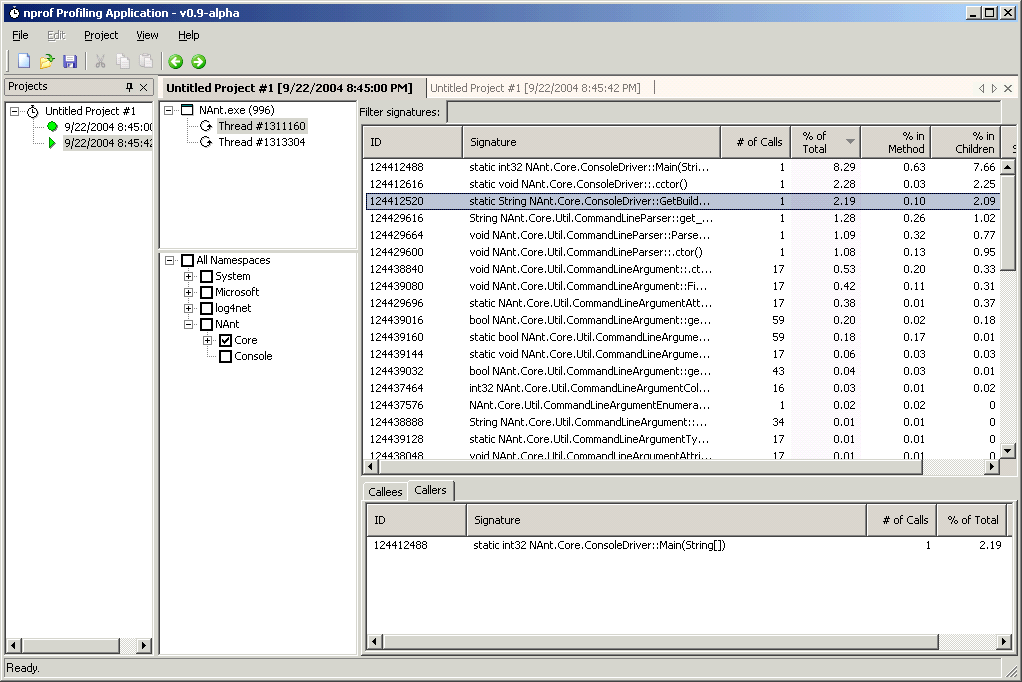
The nprof 0.9 alpha release is now available. This release will fix the problems with profiling .NET applications that spawn other .NET applications, as well as improving the GUI in a number of places.

Here’s some screenshots from the new release:

Cabinet Checklist, Take Two

I’ve been doing bits of work here and there on the cabinet.  Here’s my revised phase one to-do list with completed items crossed out (they may not appear crossed-out in my RSS feed).  Stuff that I decided not to do, or decided to modify or added since the last list is in red:

Stage One: Construction

  • Round cabinet corner sides (won’t be doing this).
  • Attach 2x4’s to sides of cabinet for all edges, monitor and speaker/marquee shelves.
  • Construct strong monitor shelf from already-cut wood and 2x4’s.
  • Attach cabinet sides to base, using 2x4s to connect sides together.
  • Install cabinet front using Blum hinges and key lock. (decided not to put hinges on the front, just screwed it in)
  • Install cabinet back with Blum hinges and key lock.
  • Cut 45-degree angles on cabinet back diagonal piece.
  • Install cabinet top and back diagonal piece.
  • Cut T-moulding groove with router and slot-cutting bit.
  • Install T-moulding.
  • Cut 45-degree angle for control panel back.
  • Cut groove and install T-moulding on control panel.
  • Assemble control panel, using blum hinges and draw hasp for top.
  • Install drawer slides in cabinet and control panel, attach control panel to cabinet.

I’ve done some of the T-moulding grooves and installation, but I’ll leave it as unfinished until I get around to putting it in entirely.